Skip to content

Fix stick drift without opening your controller

If the stick is off-centre rather than worn, Quick Fix writes a new centre, and PlayStation pads can save that fix onto the controller over USB here, for free. Xbox and Nintendo pads can be tested here; saving the fix onto the controller needs the Windows app on Steam (£19.99 once). Get a Health Score out of 100, then run Quick Fix if the centre is only off, not worn.

Connect a controller and run a free scan with your hands off the sticks. You will see resting drift, how evenly the stick travels, and trigger behaviour, plus a 0-100 Health Score that splits out each part. If the rest point is steady but off-centre, Quick Fix can write a new centre. If the signal is noisy, the honest answer is usually a replacement, not another calibration. The test runs in desktop Chrome, Edge or Opera. Nothing from the scan is uploaded to a server.

Before / After

Before
58
After
81
  • Resting drift4.8% → 0.9%
  • Centre offset0.07 → 0.01
  • Circularity11% → 6%
Illustration (58 → 81). In the Lab, Before / After is built from your scans after Quick Fix.
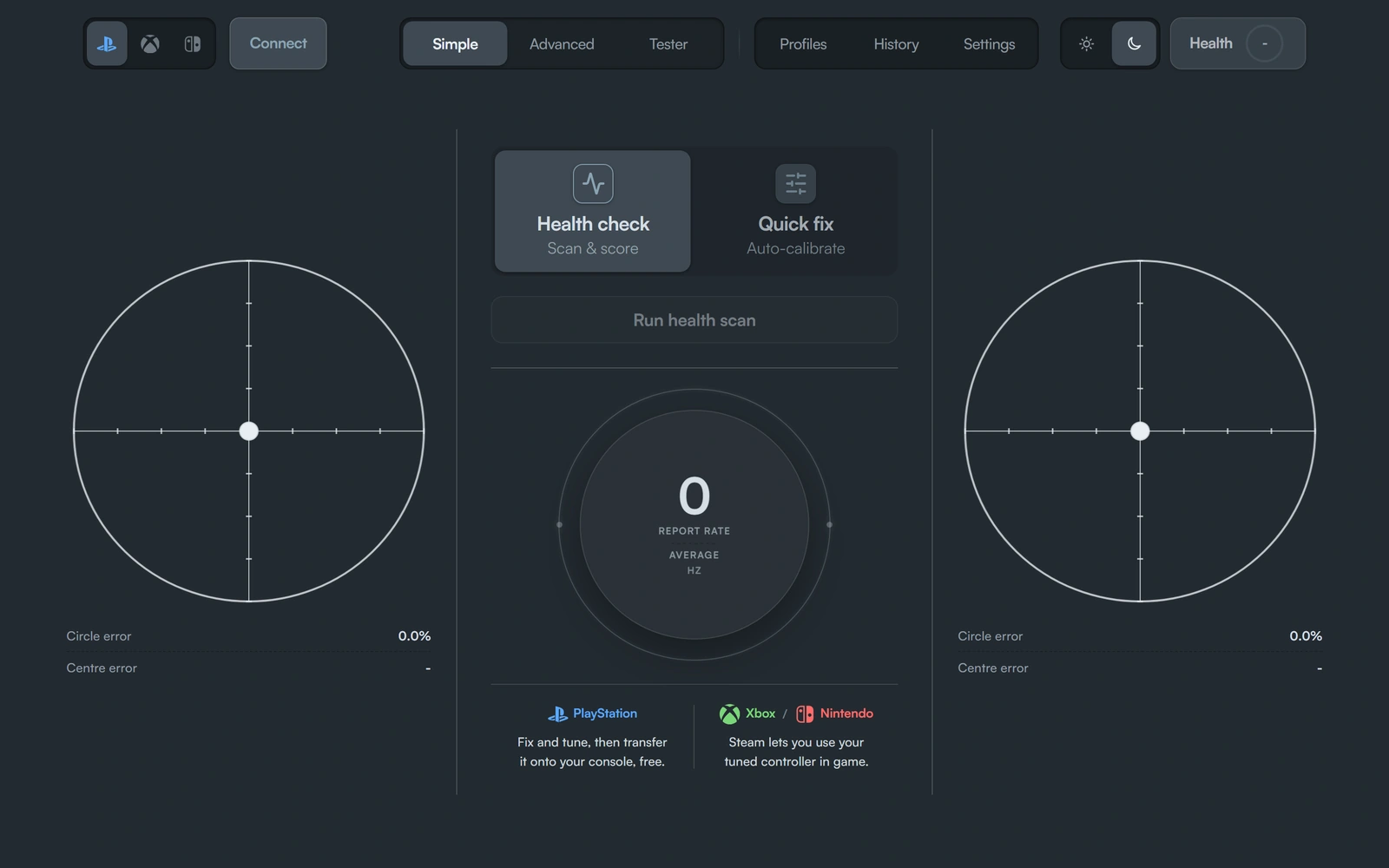
The DriftNo Lab in a desktop browser, showing live stick scopes beside the Health Score and Quick Fix controls.
The Lab: live stick scopes, Controller Health Score and the guided Quick Fix path.

Why DriftNo instead of another tester

Plenty of sites will draw a dot moving on a grid. The hard part is turning that into a decision, and then proving the decision was right.

  • A number, not a vibe

    Controller Health Score condenses resting drift, circularity error, jitter and trigger behaviour into one 0-100 figure, with the component breakdown underneath.

  • It attempts the fix

    Quick Fix applies the correction your scan calls for. PlayStation Save to console writes the pad over USB on the web. Xbox and Nintendo Save to console over USB in the Steam desktop app.

  • You see the result

    Before and After scores side by side, with the drift delta. If the fix did not help, you see that too.

  • It tells you when to stop

    If the scan sees wear, DriftNo says replace the module rather than selling you a calibration that will not hold.

What you get in the Lab

Simple mode is the two-minute path. Advanced is the full workbench of deadzones, triggers, device tests, and Repair check, all without paying. Premium is for profiles, history, automation, and custom curves when you outgrow one session.

Guided scan → Quick Fix → proof

Simple (free)

Connect and scan

  • Connect and identify the pad; capability-aware Quick Fix path
  • Full health scan and Controller Health Score with component breakdown

Fix and prove

  • Guided Quick Fix covering centre, range, and auto cal where the pad allows
  • Before / After comparison with score and drift delta

Live diagnostics

  • Live Input scopes, circularity ring, and estimated feel preview
  • Gamepad tester bench for sticks, triggers, and buttons

Transfer and share

  • PlayStation USB transfer to console on the web; Xbox and Nintendo Save to console on Steam
  • Session Save in the browser until you close the tab, not a named profile
  • Share card PNG

PlayStation USB transfer to console is free and is not part of Premium.

What software can and cannot fix

Stick drift has more than one cause, and only some of them are correctable in software. Knowing which you have saves money.

  • Centre offset

    • A stick that rests off-centre is the classic case software helps with. Centre calibration moves the resting point back.
  • Uneven range or shape

    • If full deflection does not reach the edge evenly, range calibration and circularity correction can even it out.
  • Small resting wobble

    • Low-level noise around centre can be masked with a measured inner deadzone instead of a guessed one.
  • Post-repair setup

    • After a stick module swap, including Hall effect or TMR, calibration is how you make the new hardware read correctly.

Find your controller

Capability differs by pad, especially for calibration writes. Each page states exactly what works in a browser and what needs the Steam app.

PlayStation

Save to console over USB in Chrome or Edge, or in the Steam desktop app.

Xbox

Test and Health Score on the web. First-party Xbox pads Save to console over USB on Steam.

Nintendo

Test and Health Score on the web. Switch Pro and Joy-Con Save to console over USB on Steam.

Full compatibility list including third-party pads.

Start where your problem is

Works with

  • PlayStation
  • Xbox
  • Nintendo

Capability differs by controller. PlayStation pads can Save to console over USB on the web. Xbox and Nintendo Save to console over USB in the Steam desktop app. See the full list.

FAQ

Is DriftNo free?

Yes for the full fix path. Health scan, Controller Health Score, Quick Fix, Before / After, and the gamepad tester are free. So is the whole Advanced bench: deadzone sliders, trigger calibration, linearity wizard, device tests, and Repair check. So is PlayStation USB transfer to console. Premium (£10 once) adds named profiles, health history, Auto Optimise, custom curves, per-axis sensitivity, and session PDF export in this browser.

What is in Advanced without paying?

Switch to Advanced in the Lab for stick inner/outer/anti deadzones, curve presets, linearity testing, trigger cal and trigger deadzones, scope plot styles, manual centre/range cards, pad-specific device tests, Repair check after hardware work, and calibration backup tools. You can preview all of that without Premium. Paying only matters if you want profiles, history, Auto Optimise, custom curves, or a PDF report.

Does DriftNo fix stick drift permanently?

It depends on the cause. If the stick rests off-centre but is otherwise stable, calibration can correct it and the correction holds. If the potentiometer is worn (scratchy, jumpy, drift that comes back within minutes) no software can repair that. DriftNo tells you which case you are in instead of guessing.

Which browsers and devices work?

Chrome, Edge or Opera on a desktop or laptop. Calibration writes use WebHID, which needs a USB connection on most controllers. Firefox and Safari do not support WebHID, and phone browsers cannot run the tool. Use a computer, or the mobile app when it is available.

Can I calibrate without opening the controller?

Yes on DualSense and DualShock 4 in the browser over USB. Xbox and Nintendo Save to console over USB in the Steam desktop app. Unplug and take the pad to your console. No disassembly and no soldering.

Does it work with Xbox controllers in the browser?

Yes. Test, score, and tune Xbox pads in the browser. Save to console for Xbox writes the pad over USB in the Steam desktop app. Unplug and use it on your Xbox.

Does Before / After use my controller’s real scans?

Yes. In Quick Fix, the before and after Health Score, drift, and shape metrics come from your pad’s own readings, not a generic average. Site illustrations may show sample scores (for example 58 → 81); your Lab pair is always yours. Software tuning often moves the score less than replacing a worn stick module.
Find out what is actually wrong

Connect your controller and run a scan. It is free, it takes about two minutes, and you get a number you can compare against later.